> ## Documentation Index
> Fetch the complete documentation index at: https://trygradient.ai/docs/llms.txt
> Use this file to discover all available pages before exploring further.
# Audit log
> Who made each administrative change, what the log guarantees, and how long entries are kept
# Audit log
The audit log answers one question: Who changed this, and when. It records the administrative
actions in your organization, such as a role change, an API key, an erasure, and a session reopen.
Only Gradient users with the **owner** role can access it, at **Settings, Audit log**.
 ## What the log records
| Entry | What it means |
| ----------------------- | ---------------------------------------------------------------------------------------------------------------------------------------------------------------------------- |
| **Member invited** | A person was invited into the organization. The detail line gives the role. |
| **Member role changed** | A member moved between reviewer, member, admin, and owner. The detail line gives the previous role, the new role, and the source when an identity provider drove the change. |
| **Member removed** | A member lost access. The detail line gives the role they held. |
| **API key created** | A key was issued. The detail line gives the key prefix. |
| **API key revoked** | A key stopped working. The detail line gives the key prefix. |
| **Candidate erased** | A candidate and all their work were permanently erased. The detail line gives the number of sessions. |
| **Assessment erased** | An assessment, its sessions, and its files were permanently erased. |
| **Session reopened** | A finished session was reopened at a phase. The detail line gives the status the session had before. |
## What the log does not record
* **Changes your identity provider pushes.** If you provision people with SCIM, the record of a
create or a deprovision is in your provider's directory log, not here. Gradient does record a
role change when the person next signs in and their group no longer matches their role. That
entry names the source, for example `scim_group`.
* **Reads.** The log covers changes. It does not record who opened a candidate report.
* **Candidate activity.** What a candidate did during an assessment is on the session timeline, not
here.
* **Organization settings.** Gradient keeps a separate history of settings changes with the previous
and the new value. It does not appear on this screen.
## Reading a row
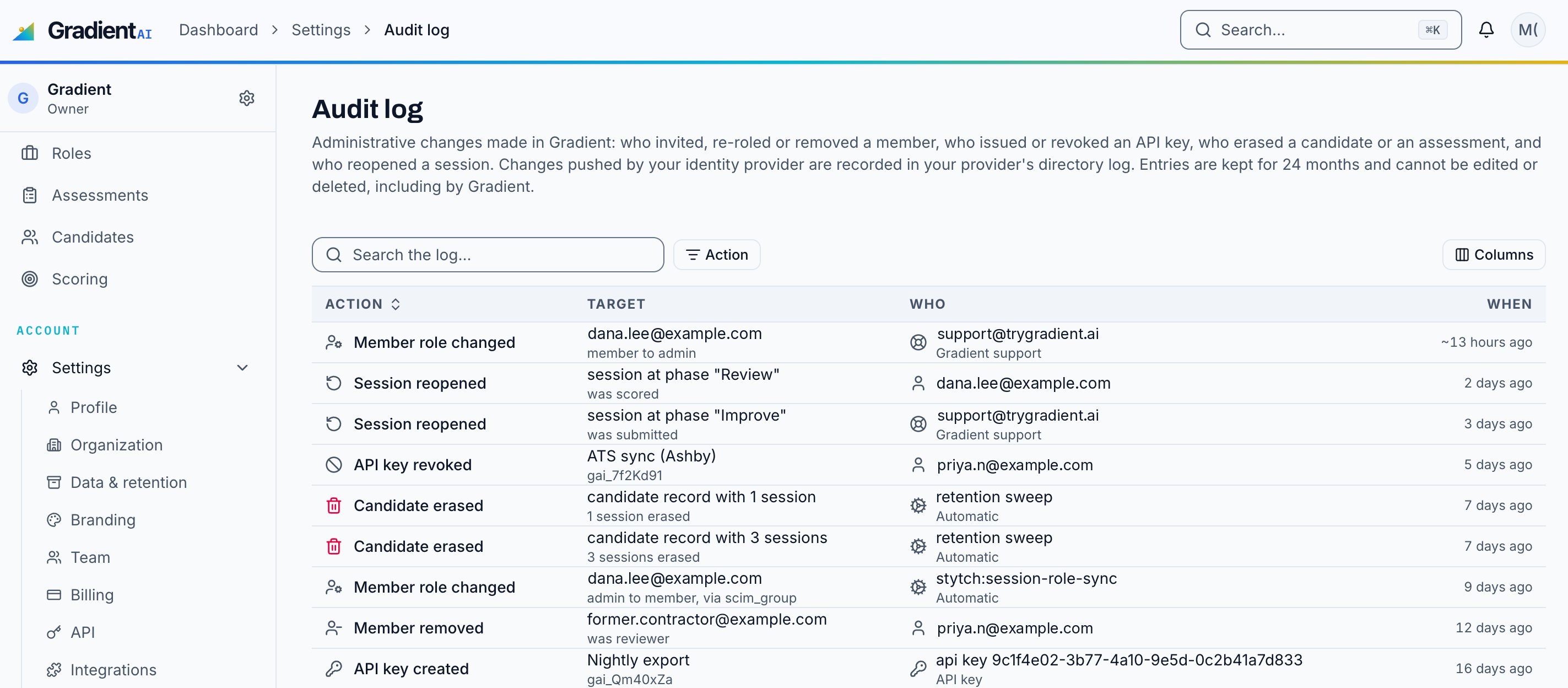
Each row has four columns: The **action**, the **target** it acted on, **who** did it, and
**when**. Under the action and the target, a second line adds the detail that matters for that
action, such as `member to admin` or `3 sessions erased`.
The **Who** column names one of five kinds of actor:
| Actor | What you see |
| ----------------------------- | --------------------------------------------------------------------- |
| A member of your organization | Their email address. |
| Gradient support | Their email address, with **Gradient support** under it. |
| An API key | The key, with **API key** under it. |
| An automatic job | The job name, such as `retention sweep`, with **Automatic** under it. |
| An operator script | The script name, with **Script** under it. |
## Finding an entry
* **Search** matches the action, the target, and the actor.
* **Action** filters to one kind of entry, for example only the erasures.
* **Columns** hides a column you do not need.
Entries are newest first, 25 to a page. The screen holds the 250 most recent entries.
## Additional details
**Nobody can change an entry.** The log is append-only, and the database refuses an update or a
delete from the application or from Gradient staff.
**One organization sees only its own entries.** Every read is scoped to your organization.
**Retention minimum.** The minimum retention period is 12 months, in line with the SOC 2 observation
window.
**No candidate names or emails.** An erasure entry proves that a candidate record was erased, and
by whom. Candidate personal identifiers are not included.
## Retention
By default, Gradient keeps audit entries for **24 months**. This is separate from the retnetion period for candidate work, which is set in **Settings, Data & retention**. A legal hold overrides
both, as it does elsewhere in the retention policy.
Candidate data is erased 30 days after deletion by default, but the entry that records the
erasure lives for 24 months.
## Limits today
* There is no API and no export for the log yet. Reach out to your Gradient representative if you need a copy of your organization's logs.
## Related
The four workspace roles, and who can do what.
Let your directory own membership, and read its changes in its own log.
## What the log records
| Entry | What it means |
| ----------------------- | ---------------------------------------------------------------------------------------------------------------------------------------------------------------------------- |
| **Member invited** | A person was invited into the organization. The detail line gives the role. |
| **Member role changed** | A member moved between reviewer, member, admin, and owner. The detail line gives the previous role, the new role, and the source when an identity provider drove the change. |
| **Member removed** | A member lost access. The detail line gives the role they held. |
| **API key created** | A key was issued. The detail line gives the key prefix. |
| **API key revoked** | A key stopped working. The detail line gives the key prefix. |
| **Candidate erased** | A candidate and all their work were permanently erased. The detail line gives the number of sessions. |
| **Assessment erased** | An assessment, its sessions, and its files were permanently erased. |
| **Session reopened** | A finished session was reopened at a phase. The detail line gives the status the session had before. |
## What the log does not record
* **Changes your identity provider pushes.** If you provision people with SCIM, the record of a
create or a deprovision is in your provider's directory log, not here. Gradient does record a
role change when the person next signs in and their group no longer matches their role. That
entry names the source, for example `scim_group`.
* **Reads.** The log covers changes. It does not record who opened a candidate report.
* **Candidate activity.** What a candidate did during an assessment is on the session timeline, not
here.
* **Organization settings.** Gradient keeps a separate history of settings changes with the previous
and the new value. It does not appear on this screen.
## Reading a row
Each row has four columns: The **action**, the **target** it acted on, **who** did it, and
**when**. Under the action and the target, a second line adds the detail that matters for that
action, such as `member to admin` or `3 sessions erased`.
The **Who** column names one of five kinds of actor:
| Actor | What you see |
| ----------------------------- | --------------------------------------------------------------------- |
| A member of your organization | Their email address. |
| Gradient support | Their email address, with **Gradient support** under it. |
| An API key | The key, with **API key** under it. |
| An automatic job | The job name, such as `retention sweep`, with **Automatic** under it. |
| An operator script | The script name, with **Script** under it. |
## Finding an entry
* **Search** matches the action, the target, and the actor.
* **Action** filters to one kind of entry, for example only the erasures.
* **Columns** hides a column you do not need.
Entries are newest first, 25 to a page. The screen holds the 250 most recent entries.
## Additional details
**Nobody can change an entry.** The log is append-only, and the database refuses an update or a
delete from the application or from Gradient staff.
**One organization sees only its own entries.** Every read is scoped to your organization.
**Retention minimum.** The minimum retention period is 12 months, in line with the SOC 2 observation
window.
**No candidate names or emails.** An erasure entry proves that a candidate record was erased, and
by whom. Candidate personal identifiers are not included.
## Retention
By default, Gradient keeps audit entries for **24 months**. This is separate from the retnetion period for candidate work, which is set in **Settings, Data & retention**. A legal hold overrides
both, as it does elsewhere in the retention policy.
Candidate data is erased 30 days after deletion by default, but the entry that records the
erasure lives for 24 months.
## Limits today
* There is no API and no export for the log yet. Reach out to your Gradient representative if you need a copy of your organization's logs.
## Related
The four workspace roles, and who can do what.
Let your directory own membership, and read its changes in its own log.